
I blogged yesterday here, regarding fetching the total Number Of Pages in an ASP.NET web-based Crystal Report in the code-behind. My original motive for doing that was replacing the default Crystal Toolbar with a custom one. And continuing from that Blog post, I present here a custom Toolbar for ASP.NET Crystal Reports, which support the complete functionality of the default Crystal Report toolbar, but performs all its actions asynchronously (using Ajax), thus preventing any page refreshes and flickers.
I use Ext.Net/ExtJs for the ajax functionality. Basically the report is loaded in an inline iframe. The default Crystal Report toolbar is switched off, and instead a custom toolbar provides all the desired options. Any action like a request for Zoom, Page Change etc. is handled by loading the report again in the iframe using an async request.
The entire code for the Toolbar together with a Demonstration page is attached below.
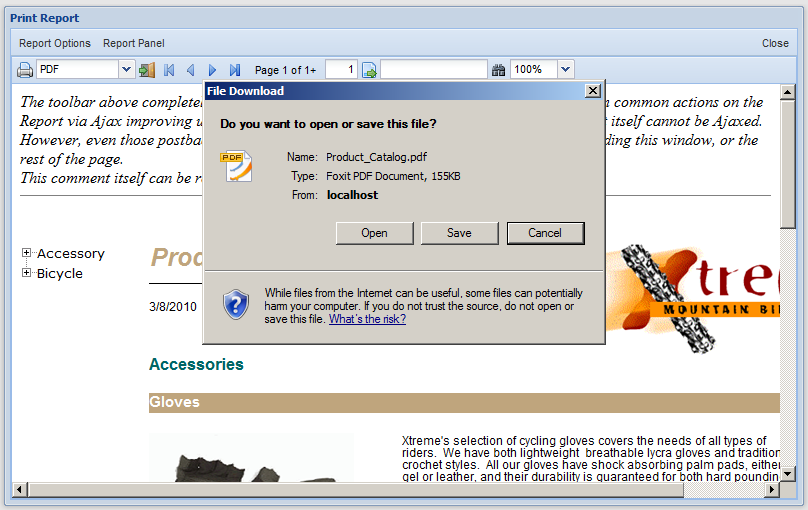
Here are some screenshots for this toolbar:


Excelent, i was looking for this a lot. Thanks man.!!!!
Hello Rahul,
Excelent job, i was looking for this a lot. I have created out custom crystal report control to show report. All thing is working fine. But when I add it in IIS (Windows 7 (IIS7)) and when I open report and click on print, It l hang. I increase AjaxToolkit Postback time out from 60 to 3600. but it not work at. I am using CType(Session(_ReportSource), CrystalDecisions.CrystalReports.Engine.ReportClass).PrintToPrinter(1, False, 1, 1).
The above code is work fine in VS 2008 ID. but it not work in iis.
Your above code is work fine when I add it in iis.
Please give me idea how to it work. and what is you doing in it ?
Please reply as soon as possible.
Thanks & Regards,
Rupen
That is very well done. I ended up writing a cut down toolbar but leaving the Crystal toolbar visible!
Hi . This is very good job
but , How can I use this component for my project?
could you be nice please , to give an instruction for this?
Thank you
Excelent.
I know it’s a little late, but you made the version 2.0
Thank you.
Hi
I have tried to execute your code from VS 2010. But it gives following javascript error at run time.
“Microsoft JScript runtime error: Object doesn’t support property or method ‘createContextualFragment'”
Can you help me to resolve this?
Even thought rendered file size is 8 kb I cannot attach it. Ext scripts seem to load from local disk.