
Internet Explorer (IE) 8’s Developer Tools seem to have a strange issue. Every once in a while, it simply refuses to show up on my screen. No matter how many times I click the Developer Tools button in IE’s menu, or press F12, the tools simply wont show up on the screen.
Its more confusing because you can see the Developer Tools button in the taskbar, and clicking it multiple times gives the button focused and minimized look as happens normally when clicking taskbar buttons. But still, there’s no sign of the Tools window on the screen.
 I traced this problem to the Developer Tools’ window strange behavior of resizing itself to a small title bar (as you can see in the screenshot on the right), and even going off screen with negative offsets for its position. Its almost impossible to figure out this miniscule title bar behind other windows or icons on your desktop.
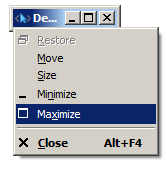
 When it happened earlier (and after I figured out this tendency of the Developer Tools), I normally resolved it by clicking the Tools taskbar button to bring the tools to focus, and then pressing “Alt+Enter”. This brought up the Control menu for the window, from which I selected “Maximize” by pressing “x” and the Tools window then appeared normally on the screen (note that I was unable to see even the miniscule title bar of the window on the screen, meaning it had gone off screen with negative or large positive offets, and therefore clicking the Maximize title bar button was not an option). After pressing “Alt+Enter”, pressing “x” maximized the window and focused it normally on screen.
However, the last time, even this did not help. Nothing was happening after pressing “Alt+Enter” followed by “x” but the Dev Tools taskbar button was there. The last time, I had to follow the more wierd approach of having to open the Windows Task Manager (Alt+Ctrl+Del), going to Applications tab, right-clicking the “Developr Tools” row and selecting “Maximize” from the context-menu.
I am really surprised at this strange behavior of the Developer tools, especially as I haven’t seen any other application behave this way. The control menu approach specified as the first option above really took me sometime to figure out 🙂
OMG! Thank you.
I had to use the task manager to get mine.
I even tried changing screen resolutions because any other program will detect the change and move on to screen… but nooo, not a Microsoft’s IE Developers Tools… that’d be much too smart.
/rant
Thanks again.
wow, thanks for this. I had to do this in the end to get it back to normal:
Phew. Thanks for the tips above!! 🙂
And when it appears you can use this video tutorials to completely remove the menu for good 🙂
http://vid4.us/free_video_tutorial/157/internet-explorer-how-to-disable-developer-tools-menu/
This problem typically happens when the window position data F12 stores in the registry has become invalid. You can clear it by deleting:
HKEY_CURRENT_USER\Software\Microsoft\Internet Explorer\IEDevTools!WindowPos
That should set it back to default.
(Apolgoies for opening up an old thread just saw this linked from twitter.)